Why beginners fail at DSA despite good effort
Most beginners learn many topics in isolation and never revisit them with increasing constraints.
This plan fixes that with one project per week tied to each topic.
Week-wise execution plan
Week 1
Arrays, strings, two-pointer patterns.
Week 2
Maps and sets.
Week 3
Stacks and queues.
Week 4
Linked lists and recursion.
Week 5
Graphs with BFS/DFS.
Week 6
Small dynamic programming exercises.
How students should practise
For each topic, solve 2 problems: one timed, one variation.
Keep a one-paragraph explanation for each solved problem.
Connect to projects, not only interviews
Each 3 problems should map to a mini feature in a project, so the concept is never detached from delivery.
Understanding the central idea
Algorithm analysis describes how work and memory grow when the input becomes larger. It does not predict an exact number of milliseconds; it helps compare approaches before hardware and test data hide the underlying pattern.
The purpose of this article is to connect that idea to a complete working flow. Individual commands matter, but the lasting skill is understanding why each part exists and how information moves from the user's action to a trustworthy result.
Begin with the nouns and verbs in the problem. The nouns usually become data—such as a user, transaction, note, file, or task—while the verbs become operations such as create, validate, calculate, update, and report. This simple translation gives the project a shape before framework or library choices distract from the core behaviour.
It also helps to separate facts from derived values. Store facts that arrived from a trusted input and calculate summaries from those facts when possible. Duplicating calculated totals in several places creates inconsistencies because one copy can change while another remains stale.
How the pieces work together
A single pass is usually linear, a nested comparison is often quadratic, and a direct hash lookup is usually constant on average. The important step is identifying the operation that repeats as the input grows.
Build the smallest successful path first. Keep input handling, core logic, storage, and presentation distinct even when they live in one file. This makes the project easier to explain today and easier to split into modules when it grows.
Validation belongs close to the boundary where new data enters. The core logic can then work with values that already satisfy basic rules. Persistence should receive a complete valid change, while presentation should translate the outcome into language the user understands. This order prevents a partially processed request from leaking into saved data.
Naming is part of the design. A function such as calculate_monthly_total communicates more than process, and a value such as normalised_category shows that a transformation has already happened. Clear names reduce the amount of state a beginner must remember while reading the code.
A realistic flow from start to finish
Finding duplicates with two nested loops compares many pairs. Recording each value in a set changes the work into one pass: each item is checked once and then stored. The result stays the same while the growth pattern improves from roughly n-squared to linear.
Follow one record through the whole system and inspect its value after every meaningful transformation. This is more instructive than copying a finished code listing because it reveals where assumptions enter the program and where an incorrect value would first become visible.
For the first implementation, use a tiny dataset that can be checked by hand. Three or four records are usually enough to expose ordering, totals, duplicates, and empty-state behaviour. Once the hand-calculated result agrees with the program, add a larger or messier input and observe which assumptions no longer hold.
Keep the successful flow visible in the interface or console output. The result should confirm what changed and include the identifier or summary needed for the next action. A generic message such as “done” hides useful evidence and makes later debugging unnecessarily difficult.
Reliability and common failure points
Complexity is only one constraint. Hash tables use extra memory, sorting can simplify later work, and small datasets may favour readable code. State the expected data size and measure realistic cases before optimising production code.
Treat error handling as part of the user experience. A useful error message says what failed, what remained safe, and what action can be taken next. During development, keep technical detail in logs while presenting concise recovery guidance to the reader or end user.
Test failures at the same layer that owns the rule. Input-format tests belong near validation, calculation examples belong near the core logic, and save-and-reload checks belong near persistence. This makes a failed test point toward one responsibility instead of forcing the learner to inspect the entire application.
Retries also need care. A retry should not create a duplicate record or repeat a payment-like action. Stable request identifiers, uniqueness rules, or an explicit check before writing make repeated actions safe. Even a beginner project benefits from understanding that users double-click buttons and networks repeat requests.
What a complete result demonstrates
A strong solution explains correctness first, then time cost, memory cost, and the trade-off that made the chosen approach appropriate.
At that point, improvements such as a richer interface, more automation, or cloud deployment become controlled extensions rather than substitutes for an unfinished core. The result is a project that teaches transferable reasoning as well as syntax.
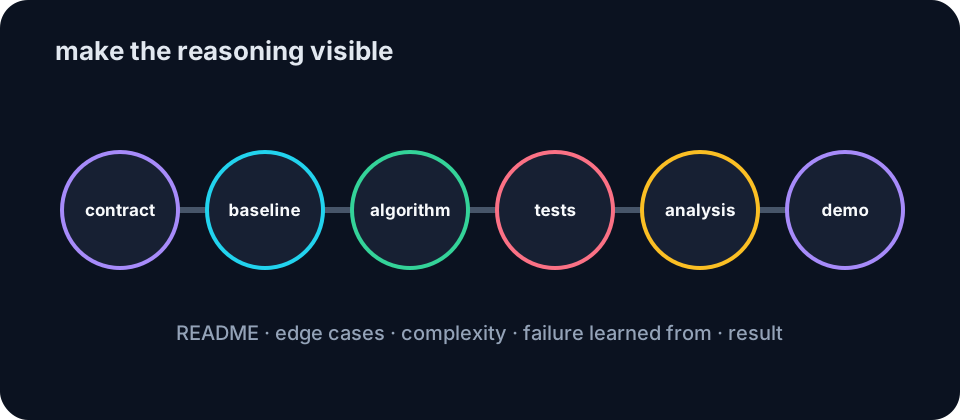
Document the final flow in a short README with setup steps, one realistic example, expected output, and known limitations. This turns the project into something another person can run and review. It also reveals missing assumptions that were obvious only on the original developer's computer.
The best next improvement is the one supported by evidence from actual use. A confusing message may matter more than a new chart, and protecting saved data may matter more than adding another button. This prioritisation habit is one of the most valuable lessons an end-to-end project can teach.
Worked case study: from problem to evidence
This is an illustrative case study designed to make the engineering decisions concrete. It does not claim results from a named organisation; every conclusion follows from the described inputs and observable behaviour.
Starting situation
A learner portal checks a growing submission list for duplicate student IDs. The first version compares every row with every other row and feels acceptable with 50 records but becomes visibly slow with tens of thousands.
Intervention
The duplicate check records each ID in a set during one pass. Encountering an ID already in the set identifies the duplicate immediately while preserving a clear correctness argument.
Evidence collected
Operation counts reveal the difference without relying on a particular laptop: pairwise comparison grows roughly with the square of the record count, while the set-based version performs approximately one lookup per record.
Practical lesson
The improvement comes from remembering useful past work. The algorithm trades additional memory for fewer repeated comparisons, a common and important engineering trade-off.
A useful case study separates observation from opinion. The starting state records the problem, the intervention records what changed, and the evidence shows whether the change produced the intended behaviour. This structure helps readers evaluate an approach instead of accepting a success claim without support.
Test cases and expected behaviour
The following cases act as an executable specification. They are not questions for the reader; they state the conditions, expected outcomes, and reason each check matters.
| Test case | Input or condition | Expected result | Knowledge gained |
|---|---|---|---|
| No duplicates | IDs 11, 12, 13 | Returns no duplicate | Confirms the normal path. |
| Early duplicate | IDs 11, 11, 12 | Detects 11 at the second item | Checks early termination. |
| Late duplicate | A long list ending with a repeated ID | Detects the final repetition | Checks full traversal. |
| Growth comparison | 100, 1,000, and 10,000 IDs | Set version grows approximately linearly | Connects Big-O language to observable work. |
Run the smallest test first and keep its input stable while repairing a failure. When it passes, add boundary and recovery cases. Changing code and test data simultaneously makes the source of improvement difficult to identify.
For automated tests, use the same arrange-act-assert pattern throughout the project. Arrange creates a known starting state, act performs one behaviour, and assert compares the observable result with the documented expectation. A good assertion checks the outcome that matters to the user, not an internal implementation detail that may change during refactoring.
Interpreting test failures
A failed test is evidence of a mismatch between the implemented behaviour and the written expectation. First confirm that the expectation represents the intended product rule. Next reduce the failure to the smallest input that still reproduces it, inspect the boundary between stages, and change one cause at a time.
Failures often reveal missing product decisions rather than typing mistakes. An empty value, repeated request, unavailable service, or partial save forces the application to choose a behaviour. Recording that decision in both the article and the test suite prevents future changes from silently reintroducing the same uncertainty.
The final test report should state the revision tested, environment, cases executed, results, and any untested limitation. That short record turns “it worked for me” into evidence another learner or reviewer can evaluate.